Sunday, August 08, 2010

“Bank On Me Going Green(dot)

Banks suck. Few would argue that banks, and the corporate greed of high ranking banking officials is a large part of why our economy is so fucked right now. I'm not here to argue a political point. My beef with banks, and banking, is of a more personal nature. Namely, the policies under which personal deposits to checking accounts are governed. Bank deposit policies are bullshit (sorry if it seems I'm channeling Penn Jillette). In recent weeks I've had issues with deposits I've made not showing as available when checking my account online. Who the fuck, and at which bank, decided that the business day ends at 2PM? Furthermore, what's the point of having drop boxes to create the “convenience” of not having to stand in line, if the damn thing isn't checked regularly enough and therefore creates an inconvenience when it comes to a person's hard earned money being available to them? I'll explain.

I work for a small business. As such, I don't have access to services such as direct deposit. I have to physically take my paycheck to the bank, fill out the deposit slip and stand in line to have a teller process my deposit. For decades banks have decided that 2pm is actually the next business day. That is to say, if you make a deposit after 2pm on Monday, it's actually not deposited until Tuesday. What makes this a bullshit concept is, if it's a Friday afternoon, your deposit won't be credited until Monday because Saturday and Sunday aren't “business days”. Now, to top all that off, in the past couple of weeks I've made deposits late in the afternoon on a Thursday only to not have them show as available until after midnight on Friday (so basically, not until Saturday). This past Friday really took the cake though. It was around 4:15pm. I was hot, tired and just wanted to get home (a commute of about an hour or more depending on traffic, for me). So, when I saw how long the line was in the bank, I decided to use their “convenient” drop box since I was only depositing and not getting any cash back this time. I filled out the deposit slip and the envelope, endorsed the back of the check, put everything in the envelope and dropped it in the box and went on my merry way home for the weekend. Saturday morning, my balance still showed $26. I kept checking every so often, and still no sign of my deposit. Now, here's the kicker – the branch I went to is actually open half a day on Saturdays, so I gave them a call. I figured, since they were open on Saturday, someone would have taken anything in the drop box out and processed it. Evidently, that's not the case. Since I put it in the box so late on a Friday, and because it was a check drawn on a different bank instead of cash, that money won't be available until Tuesday! Tuesday?! Fucking really? You mean I have to survive the weekend, plus put gas in my car to get to work on Monday with only the $15 in my wallet, the $40 I have squirreled away in my change jar and the measly $26 I still have available in my checking account? WTF? Normally I'd only be annoyed, but this is a special weekend. I had planned on taking my beautiful, wonderful fiancee out to a nice dinner at one of our favorite restaurants since Thursday was her birthday, and Friday was the anniversary of our engagement.1 Now, not only can I not do that, but I can't even go get any of the hobby supplies I wanted to get so I can enjoy a weekend of painting Warhammer models.2 “Well, switch banks”, you may say. To what end? They all do stupid shit like this. No, I think I have a better plan.

With all this bullshit with banks I'm seriously considering becoming an almost straight cash person. Frankly, I've always hated carrying cash and preferred to use my check card, because 1) it's convenient, 2) it makes me more responsible about impulse and large purchases because I have to bear in mind how much is actually in the bank and 3) if I lose my card, it can be replaced; if I lose my cash, I'm just shit-out-of-luck and broke. Enter GreenDot. GreenDot is a prepaid credit card. Here's they way this thing works. I can go get a GreenDot credit card with either a Visa or MasterCard logo on it so it's accepted wherever either of those cards are accepted. If it's lost, I can have it replaced and I don't lose my balance. I can control how much is on it at any given time because it's prepaid, meaning the balance on the card is just like the balance in my checking account; whatever I put on it, is what is available for use. So, I could keep the majority of my cash, and just load up a GreenDot card with as much as I need to still be able to do online purchases and bill paying. I know for a fact (since I used to work at one) that I can go into any RadioShack and re-load it, and whatever I put on it is immediately available for use (no bullshit next business day before the funds are available crap). Now, I do understand that this plan isn't perfect. For starters, despite that fact that I'm really pissed at my bank right now, I do have to admit that I get free checking and I can use my debit card all I need/want to with no fees (save for, of course, overdraft fees if I spend more than my balance). With GreenDot there will be a start-up fee and there will be a reload fee when I load it with cash and probably a monthly maintenance fee depending on my balance or how much I've used it (however, there is no fee for direct depositing funds to a GreenDot card should I ever find a job that offers that). The plan isn't ideal, and honestly I may very well keep the bank account open with a nominal balance, depositing cash when/if needs be. I'm just tired of going through entire weekends with very limited funds available to me because of banks' dubious deposit procedures and policies. It's just nice knowing that I at least have the option of a prepaid credit/debit card without having to deal with a bank's bullshit while still being able to pay my bills or make purchases online.

~ JC

----------------------
1. Seven years... yes, I know that's a long time to be engaged, but it works for us, so :-P

2. I really wanted to get an inexpensive airbrush so I could batch paint the base coats on several at one time and quickly. Good thing I already have some prepped – not to mention I have tons of reading to catch up on. But still, it's really annoying when you make plans for your weekend and they get fucked up because of banking issues that you can't control. Also, for the record, my fiancee paid for dinner and I'll reimburse her once my deposit posts – it's just pretty shitty that she had to pay for her own birthday dinner that was supposed to be my gift to her.


Sunday, August 01, 2010

More Apps For That

(part 3 in an ever continuing saga of Apps for Android based mobile devices)

Back in November 2009 I upgraded my phone to a MotoDroid. Of course, I immediately started downloading and installing all the free apps that seemed fun or useful at the time. A month after that I wrote another blog about the device and updated my list of recommended apps. Here we are in August 2010 and once again I find the need to give an update on the apps I use. The list has changed a lot of the past eight months, and will undoubtedly continue to do so as new apps are developed and as I drop ones that I no longer use to make room in my mobile's memory for the newer more useful apps coming down the pike. With new and more powerful Android based phones coming out and my anticipation of Android 2.2 (aka “Froyo”) pushing out to my current Droid (which supposedly is happening this week), my continued use of this type of smartphone is pretty much guaranteed. I've even read that a German company is soon going to be releasing a tablet which will run an enhanced version of the Android OS to directly compete with Apple's iPad. So, here's my latest update and review of apps, all of which are available from the Android Market.

We'll begin with apps which are mentioned on m previous two lists that I've deleted and why:

  • Barcode Scanner – this app utilizes the device's camera as a bar-code scanner and links with Google Product Search to allow you to comparison shop while still in the store. I deleted it because, honestly, I just didn't use it. It's not that it didn't work, I simply just forgot I had it and since I wasn't using it, I deleted to make room in the phone's memory

  • Key Ring – this one was good in theory but not so much in practice. For those of you tired of having a bundle of little value and discount cards on your key ring you may like this. Simply scan the bar-codes from all those cards into this app and save them on your phone. The problem with it is, in the case of the MotoDroid anyway, is that the screen's reflective surface causes the bar-codes to be unreadable by pretty much every store's scanner I went to, so I gave up on it.

  • MySpace Mobile – as the name implies; who still uses MySpace though? I mean, I haven't logged into MySpace in close to a year anyway, so why have an app for it?

  • Twidroid – one of dozens of Twitter clients available in the Market. I dropped it because Twitter came out with its own official client that I personally like a little better.

  • SportsTab – a sports score app. I simply just didn't use it. The phone has full internet capability, so I just use that. Plus, I really only care about hockey, and there is a dedicated NHL app I use for that.
There are probably others that I've downloaded and deleted between then and now that I don't even remember. From the list above, I probably had more questions from people wondering how welly Key Ring worked than any of the others though. Anyway, here is a list of the apps I currently have installed.
  • Lookout – I can't believe I didn't get this sooner. A really nice rep at my local Verizon store suggested this one. It's a virus scan and data back up app. I mean, DUH!, phones can get viruses too; they are, after all, mini-computers right? Keep in mind that Android is in fact a mobile flavor of the Linux family of operating systems. If you have an Android device, having a virus scan app should be a no-brainer, and Lookout is free. It also will backup your contacts, call log and pictures to a remote server. You'll notice that, while all the others are in alphabetical order, I listed this one first because it's really that important!

  • AK Notepad – thanks to my Grandfather's influence, I've always found it useful to carry a pen and notepad in my pocket at all times. This app give me a notepad on my phone without having to worry about annoyance like pages getting torn, or my pen getting lost or running out of ink right when I need to write something down.

  • Assistant Free – if you use Pageonce and you have an Android device, you'll want this app.

  • Astrid – a very simple, but good, to-do list app. The best part is that it syncs with Remember the Milk without having to pay for RTM's premium service (which is required if you want to use the official RTM app).

  • Astro – I've mentioned this one before, but I'll list it again because it's one that I've continued to use extensively. Android does not have a built in file manager. In order to view and manipulate folders and files as you would on your desktop computer, you have to attach the device to your computer via a USB cable. Astro allows you to do see all your folders and files without having to connect to your PC. It also has tools for viewing how much memory on you micro-SD card is being used and by what, and has a built in app for backing up all your other apps so, should you ever have to replace your phone you don't have to go re-download them all from the Market, which can be quite time consuming if you have a ton of apps.

  • Bible – again, I've mentioned this one before. There are tons of Bible apps in the Android Market. The one I chose appears to have all of the various English translations as well as several foreign language translations and several Reading Plan options to help guide you through your Scripture readings.

  • ChompSMS – a client to replace the stock Text Messaging app that the phone comes with.

  • Compass – an electronic compass

  • Congress – this app will use the phone's built in GPS to find your location and then list all your congressional reps. You can see what bills they've sponsored, how they've voted on different bills and look up their official contact information. The app also lists recently passed bills and bills that are currently up for debate/vote in both houses.

  • ConvertPad – I got this one for fun, but if you find that you need to do a lot of conversions, such as Standard to Metric, this is a useful app

  • Dice Bag – if you're a gaming geek, you'll love this. It's a dice roller that covers everything from d4 to d20, including percentile dice. It even keeps a log of all your rolls for you.

  • Dictionary.com – a handy app for when you need a dictionary

  • Documents to Go – available in a free (reader only) version and a full version (that allows you to create and edit). Includes the ability to read, create and edit Word, Excell and PowerPoint documents and has a PDF reader (which is much supperior to Adobe's official Reader app in my opinion).

  • Dolphin Browser HD – a much better internet browser than the one built into the phone, in my opinion. This app utilized pinch zooming before the Android 2.1 update fixed that limitation in the stock browser. It also has tabbed browsing, which the stock browser still doesn't have.

  • Droid Light – utilizes the cameras LED flash bulb as a flashlight. I've actually had to use this a couple of times and it's quite handy to have.

  • Ebook Readers – I currently have four different ebook readers installed on my Droid – Aldiko (free, and has a pretty good library of public domain books as well as access to the O'Reilly library of tech manuals, which, alas, are not free), Kindle (the app is free, but the books aren't – gives me access to Amazon.com's selection of ebooks), Kobo (free app and a combination of both free and paid ebooks; I think this is Border's ebook reader, but I'm not sure), and Nook (Barnes and Noble's ebook library). So, why buy a ridiculously overpriced ebook reader when I can download a free app to my phone that gives me access to pretty much all of the major book sellers' libraries of ebooks? Personally, I'd rather read a real book, but I like the concept of ebooks enough to keep these apps around, especially if the above mentioned Android based tablet ever becomes something my budget allows me to buy. My old college friend, Sam, wrote an interesting little blog about this topic not to long ago.

  • Ebay- ok, I'll admit it; I've become a bit of an eBay junky lately and having this app allows me to keep an eye on all the stuff I'm watching or bidding on.

  • Fandango – an app for the popular movie site. I've not tried to actually buy my tickets through this yet (not sure if I can actually), but it's helpful for when I'm out and about and thinking of heading to a movie to check on show times.

  • Gdocs – view and edit anything I've uploaded to Google Documents

  • GolfLogix – ok, Golf GPS devices (such as SkyCaddy) are expensive as hell! This, and other apps like it, turn your Android device into a Golf GPS so you can get accurate yardages. Admitadly, I've not used it yet because it's been just to damn hot here in North Carolina for me to want to get out there and play. Plus, while I've downloaded the app, I've not paid to actually use the service yet (one of the very few non-free apps I've downloaded).

  • iheartradio – an app for listening to you favorite radio stations via streaming audio (assuming that they have made their broadcast available to this service).

  • Meridian – a UI for listening to your tunes. I like this one a little better than the stock music player as it also allows me to watch videos without having to switch apps. It's just a cleaner UI in my opinion. There are several such apps available, so go with what you like.

  • Newspapers – this app allows you to browse dozens of newspapers from around the world, including The New York Times, The Wall Street Journal, BBC News, etc.

  • NHL – an app for keeping up with National Hockey League news and scores.

  • OI Shopping List – allows me to create multiple lists which use check boxes next to each item as I complete them. Like AK Notepad, this is helping me become more green and waste less paper.

  • Pandora – if you've ever used the Pandora website to stream music on your computer, then you'll probably want their app as well. I use it for finding bands I've never heard of that are similar to bands that I already like.

  • Power Strip – this is my most recent acquisition. It's not a free app; I got it for 99cents and I think it was on sale at the time. I've always hated having icons all over my desktop, and even in Windows 7 I use the Quick Launch toolbar for my most used programs. Power Strip basically gives me similar functionality on my Droid by allowing me to have just one icon on my home screen which, whien tapped, pulls up a list of the apps I would normally have put on my home screen(s) and also gives me access to several widgets without having to leave those widgets running constantly and using up my battery if I don't need them at the time.

  • QuickTip Calculator – as the title implies, and quick calculator for figuring how much to tip. I don't use this very often, because I don't want to be “that guy” that has to do math to decide how much his server deserves for a tip, but it does come in handy at times if you're splitting the check amongst several people.

  • Stopwatch – what it sound like. A Stopwatch, with a Lap button.

  • Weather Channel – I actually use this app's widget quite often

  • Twitter – the official Android client app from Twitter. It is what it is. I've still yet to find a Twitter app that I really love. If only the developers at TweetDeck would get off their asses and come out with an Android app like they've been promising for months!

  • United States Constitution – in these very heated political times, I believe everyone should have a copy of the the most important document in United States history at their disposal. There are several to choose from in the Market; the one I chose also includes The Declaration of Independence, The Star-Spangled Banner, The Miranda Warning, The Pledge of Allegiance, and several other historical documents.

  • Voice Recorder – why buy an expensive digital voice recorder when you can download a free app that turns your phone into one? The one I have also has built in features to set your recording as a ringtone or send to others via either Bluetooth or Gmail.

  • Warhammer 40k/Combat Assistant – a dice roller app specifically for the game Warhammer 40,000. Includes a scatter dice roller. Available as a free version and a paid version with additional features.

  • Wikidroid – an app for looking up things on Wikipedia.org

  • Zedge – if you're into customizing your phone with different wallpaper and ringtones, then this is a must have app. All the wallpapers and ringtones via this app are free!
And that does it for now. As I mentioned, new apps come out all the time. Some of the above will undoubtedly be replaced when/if a better app is found, some will be deleted as their usefulness declines. I love having an Android device! Not just because I'm a gadget geek, but also because it's really made life easier having access to so many apps in the palm of hand and just a finger tap away.

~ JC

Sunday, July 18, 2010

The 20 Yard Commute

You may have noticed I didn't post a blog last Sunday. For those three or four of you who actually read this blog, I apologize for that, but I was out of town and really didn't want to use the computer I had access to to write my blog since it wasn't mine. My reason for being out of town is actually more or less what I want to write about today. I spent, along with my beloved fiancée, house and dog sitting for my aunt and her husband (who is also my employer) the entire week from July 5 through July 11. It's sad that that was the closest thing to a vacation that Roxanne and I will likely have this year, but we got paid for it and it was nice to be out of Fayetteville for an entire week. But I digress.

House sitting for my boss did allow me to experience, albeit for only four days, what it is like to work from home. Since the shop is in the backyard of the house, I only had to walk out of the side door of the house, through the gate into the backyard and voila! I was at work. I whopping twenty yards or so. Compared to my normal 65ish miles that takes around an hour from Fayetteville to Garner1, it was a nice change of pace. The only bad thing, and it really wasn't all that bad of a thing, is that I found myself still waking up when I normally would have when at home. Considering that I was also watching two pit bull-terriers, it was helpful to have that extra time, but I still ended up getting tired of watching the same news stories loop on 'Morning Express with Robin Meade' and would end up getting dressed and heading out the shop at 9:30 instead of 10:00. Like I said, not really a bad thing, just a slightly annoying thing I guess.

So, this is what that experience showed me. Working from home is pretty awesome, but it can also be distracting. You would think I would have worked more hours since I was just right there and was not as anxious about having to drive home on I-40 and I-95. Interesting thing is, it's much easier to end up taking an hour for lunch instead of only thirty minutes when all you have to do is walk from the shop to the kitchen in the house and sit with your fiancee. You also end up realizing, hey, the TV, computer, whatever-book-I'm-reading, et cetera is just right there in the house and not an hour away and I'd much rather watch TV, read a book or play on the computer than make belts or dye, finish and wax holsters. So, in that respect, working from home can be a bit of a distraction too. Having pets and working from home is also a distraction because you find yourself thinking more about if they need to go outside or if they're tearing up stuff inside more when you're right there where you can take care of it.

Sure, it saved on gas and I really didn't have to get up as early (I did manage to sleep in a whole thirty minutes extra a couple of mornings), but I'm not sure I could pull off working from home everyday. I think I'd be to likely to constantly think of things that needed to be done like laundry or painting all of those pesky Warhammer models to be very productive with my work if I did work from home; out of sight, out of mind so they say. At any rate, while I certainly would not mind having a job that allowed me to work from home (aka, telecommute), I cannot guarantee I'd be as productive doing so as I would in a shop or office away from all the hobbies and things at home that could distract me from working.2

~ JC

1. That would be Fayetteville, NC USA to Garner, NC USA in case anyone was wondering or confused. Sometimes I do actually get the random reader who doesn't know me grin.
2. Now that I think about it, the fact that I wasn't actually working from home, but someone else's home is probably why I still got my work done that week. I didn't have all my stuff with me to distract me as much. LOL

Sunday, July 04, 2010

Flu Bugs, Painting Models, eBay, Smoke Juice, and General Mayhem

This week's blog is a pretty mixed up pile of commentary. It fits well the overall title of the blog actually. I've spent this entire past work week (Monday – Friday) at home with a lovely case of the Flu. Of course, this went over like a big lead balloon at work I'm sure. Not that there was a ton of stuff going on at work this week, what with the Independence Day weekend coming up and no shows going out, but there is/was a very large dealer order to be filled and I wasn't there to help with it. I spent the bulk of the week taking TheraFlu or NyQuil and sleeping. In between naps, I tried to keep folks abreast of my illness via Facebook and Twitter.

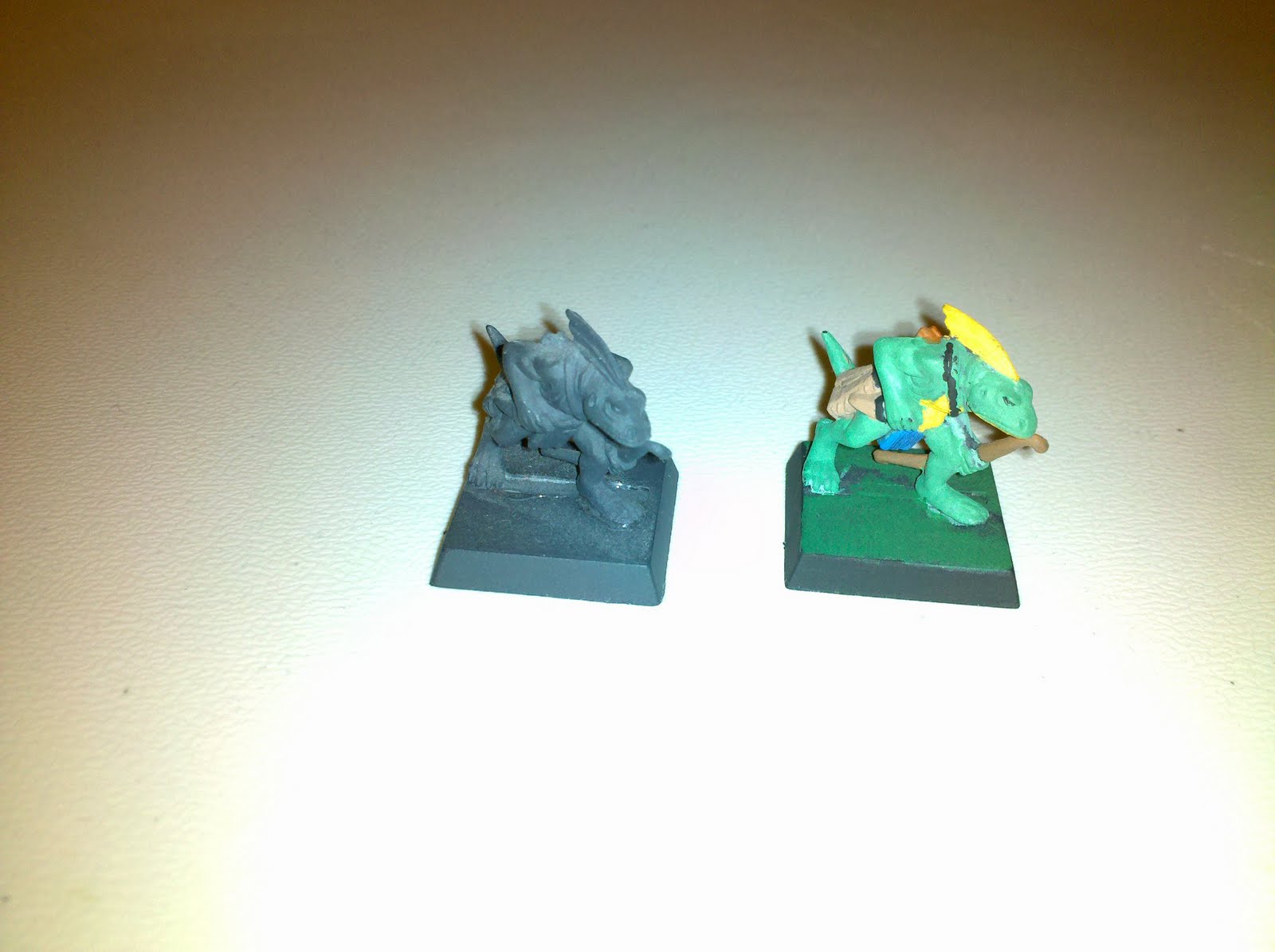
Prior to the week of sickness, I had attempted to start painting again in the form of Warhammer models. Being as that I could feel the sickness coming on even as early as Friday (6/26) and my nose kept running, it made painting rather challenging. I mean, try painting a 28mm detailed miniature while having to stop every few seconds to grab a Kleenex. To the left is an unpainted model next to the one I painted (a task that took me several days to complete because I didn't feel well enough until late Wednesday (6/30) to finish some of the details, hence the reason only one out of a few dozen has been painted). As you can see, I suck at painting. To give myself some credit, it's the first time I've painted anything like that in over ten years, so I actually did pretty good. Now I just have to nut up the gumption to try things like washes and dry brushing to bring out the minute details in the model. I never was all that good at either of those techniques, probably because when I was a thirteen year old D&D geek, I didn't even know those techniques existed. I always liked to look at pictures of completed models and miniatures and always wondered how they got them to look so vibrant. Well, now I know, I just need to learn how to do it myself. So, the one model I've painted is technically incomplete from a certain point of view – but I had fun painting it and I've got plenty more models in the one Warhammer boxed set I own to keep practicing on (it's not like I can't strip it and repaint it later after I get good at it).

Speaking of Warhammer, I'm afraid to admit that it's causing me to become somewhat of an eBay junkie. I'm not going overboard buying and bidding, but I do have about a dozen or more things that I'm watching at any given time. I've logged into my eBay account more in the last two weeks than in the last two years I think. Previously I was looking to rebuild my collection of role playing game books. Now I'm searching for deals on Warhammer 40,000 models. It's a good thing too, because I have to admit, the prices on eBay are tons less expensive than actually going through Games Workshop itself. Case in point, the “Space Wolves Battleforce” retails for $90 on GW's website, but I've found it for as little as $64 (or less) on eBay! Of course, I have to keep an eye on how much folks are charging for shipping else I'm right back to paying as much as I would from GW.

In other online ordering news, I finally decided to order some Johnson Creek Smoke Juice to try to refill my spent e-cigarette cartridges myself. Being as how most of my empties are menthol, and I really didn't want to find out what it would be like to mix flavors, I ordered a half ounce bottle of their Arctic Menthol smoke juice. At only about $10 (plus shipping) for a half ounce bottle, it's actually way cheaper than ordering the actual cartridges from Red Dragon which would run around $12 for four cartridges. The trick now is to figure out just how much to drip into the cartridges. To much, and it'll leak (and I'm sure that would taste just nasty) and to little would be like I never put anything in them at all. Of course, everyone else's opinion is that I should just quit smoking altogether. Naturally, that would be ideal, but until I can work on overcoming the nicotine addiction completely, I'll keep using the e-cigarettes as a way to reduce my actual smoking. Incidentally, for those of you who smoke – who do you find to be more obnoxious, those who have never smoked, and therefore have no idea how hard it is to quit, or those who have managed to quit and act all superior because they were able to and you haven't yet? Just curious.

In the general mayhem department, well, the flu causes just that. Being sick always sucks, but when it causes you to miss work when you get paid by the hour, it really sucks. When sickness means not even being able to read or write or paint or whatever else you enjoy doing, then it just makes the days you are sick seem that much longer because all you can do to pass the day is either sleep, or watch TV in a cold-medicine haze. Eating isn't enjoyable because you can't taste anything, and you feel like if you see another can of chicken noodle soup you're going to scream (which, of course, would hurt like hell because of the sore throat).

The other thing being sick slows me down on is job searching. I like my job – there's something about taking a shoulder of bull-hide and turning it into a bunch of quality belts or seeing it become a batch of gun holsters that's pretty cool. But it's not a career. With my fiancee actively searching for work in her field, now that she has her Master's degree, I also sort of need to have a job that would allow me to easily transfer. I've hesitated about filling out applications with places, like BestBuy for example, because of a slight sense of loyalty to my current employer (who's also my uncle by marriage) and also because of things coming up like Jury Duty that could interfere with things. Not to mention, I'm not really sure I want to go back into working retail again, but hey, that's what I know and what I'm good at; plus someplace like BestBuy could lead to experience in actual computer technician work while working on a degree and/or certifications in the Information Technology (IT) field at the same time. Anyway, I need to sort that out soon... very soon.

~ JC