Showing posts with label EBooks. Show all posts

Sunday, June 23, 2013

A Tale of Three eBook Apps


When I got my first Android smartphone back in 2009 (the Motorola Droid, if you’re interested), one of the very first apps I downloaded was Aldiko Book Reader. It took almost two years before I actually used it, even though I downloaded several public domain classics using its built in store. Since then, I am now on my third Android based smartphone (again, if you give a shit, I recently upgraded to a Samsung Galaxy Note II) and have not only the aforementioned Aldiko app, but also the Nook and Kindle apps. I have also embraced ebooks as a format and also own a Nook Tablet.

Since going to the Galaxy Note II and its generously sized 5.5” screen I’ve practically abandoned using my Nook Tablet for reading these days. That being said, it is worth giving a brief overview of the three reader apps I now use to indulge my reading habit.

I suppose the first question to be answered is, “Why three readers? Why not just pick one and go with it?” That’s a fair question, for which there is a logical answer; I like having options. Having three reader apps installed on my Note allows me the option of acquiring ebooks from multiple sources instead of being locked into a single, proprietary source. As much as I enjoyed my Nook Tablet (at least as a reader, as a tablet it’s severely lacking) it limits me to Barnes & Noble’s store for the most part. While it’s true that I can (and have) sideload the occasional DRM free ebook (as long as it’s in the .epub format), there are still things that I want to read that are exclusive to Amazon and therefore require the Kindle software to open (which uses a file format called .mobi). I have also discovered a few independent authors, and continue to find others via Twitter, some of whom self-publish via Smashwords or occasionally offer their books for free as a limited time promotion via either Amazon or Barnes & Noble. Then, of course, there is the occasional pricing difference between the two bookselling giants.

As far as the readers themselves are concerned, it is difficult to pick a favorite, although I have to admit, thus far I have only read one book using the Kindle app and right now it is my least favorite of the three. The Kindle app, unlike the other two, utilizes location numbers instead of page numbers, which is just confusing as hell. It also has a very limited interface in terms of displaying my library and customization of settings. Speaking of settings, I actually prefer the Nook app over the Nook device itself for this very reason; strange as it sounds, the Android app version of the Nook software renders the text better in my opinion, and I also like the animated page turns on the Nook app that look like a real page flip (why this animation is missing from the Nook device software is a mystery to me). For displaying of books in the library collection for the particular reader, I tend to prefer Aldiko because I can display them as a list or in “shelf view” as well as being able to sort by either author or title. I guess the only problem I have with Aldiko is that it is exclusive to the Android platform and since it’s a standalone reader there is no ability to sync between my phone and my laptop as I can with both the Nook and Kindle apps which also are available for Windows 8.

Neither the Kindle nor the Nook app will show my wishlists that I have stored on the Amazon or Barnes & Noble websites, which I find annoying as it forces me to shop from the site instead of from the app if I want to get something that I’ve previously saved for later. However, they both do a decent job of syncing items that I’ve already purchased, and I do like that the Nook software has an archive feature so that things I’ve already read need not be displayed in the list on the Android app, Windows 8 app or on the Nook device.

All three have options for margins, text size and whether or not to display the traditional black text on white background or white text on black background for low light/night time reading. There doesn’t seem to be a clear cut winner in this category, although the switch from day settings to night settings is a bit faster on the Aldiko app than the other two as it’s basically a single tap. Aldiko also has more fine tuned control over margins versus the three of four options of Kindle or Nook.

The bottom line is, all three serve their purpose - allowing me to read a good book on the go without having to carry around more than one device or an entire, heavy stack of dead trees. Having all three allows me the option of multiple sources for material as well. So, I’d say it’s a pretty safe bet that I’ll continue to have Aldiko Book Reader, Kindle for Android, and Nook for Android installed on any and all Android devices I own or ever will own for a very long time to come.

~ JC

------

Play Store App Links:


------

Other Blogs I’ve Written about ebooks and readers:

Sunday, July 15, 2012

The Great Book Debate

I love books; not just reading them but collecting them (1) as well. I’ve blogged recently about having purchased a Barnes & Noble Nook. I have several ebook apps on my Android phone including Nook for Android, Kindle for Android, and Aldiko (2). Part of the debate when deciding what to read next, for me, is whether or not to get it in ebook format or “dead tree” format. One the one hand, I love the feel and smell of real books, but with ebooks, I can carry several with me at one time without making my backpack weigh a ton. Of course, not everything is available in ebook format yet, so sometimes the point is moot.

I already own books that I have yet to read, both hard copy and electronic. I also have a growing list of books on my wish list in my Nook account. There are books by authors I have never read (or even heard of before) as well as ones by authors that I have considered amongst my favorites. The challenge here is, do I go with an author, and genre, I am familiar with and, based on experience, am fairly sure to enjoy, or do I take the gamble of reading something completely new?

To add to this conundrum of what to read, and in what format, is the option of audio books. I’ve not ever really used audio books before (3), although I do see the appeal of them. To a certain extent, I view audio books as sort of cheating. It’s not really reading; it’s listening to someone else read. One of the things about reading that I love is that it allows me to tune out for a bit. I typically try to find a quiet place to read, where there are few, if any, distractions. However, in our current society of “go, go, go”, finding time to do that isn’t always so easy. There are only so many hours in a day, and even when I get home from work, there are household responsibilities that have to be taken care of (laundry, taking out the trash, etc.). Even on the weekends when it would seem I have more “free” time, there are errands to run. These things lend themselves to wanting to give audio books a try.

Whatever the format, one thing is certain - with the declining quality of television, I really need to make more time to read.

~ JC


---
(1) Note: the collection I have listed on LibraryThing does not (yet) include all of the ebooks and various gaming materials I have in PDF.
(2) Aldiko is actually the first ebook reader I ever used. After attempting a few ebooks on my Android phones and determining that I liked the idea of ebooks, I bought a Nook in order to enjoy ebooks on a larger screen.
(3) The only time I can recall using an audio book was in college, when I had tons of required reading to do. I remember listening to the Old Testament on cassette to satisfy the reading requirements for my Old Testament Survey class while simultaneously reading various textbooks.

Sunday, March 18, 2012

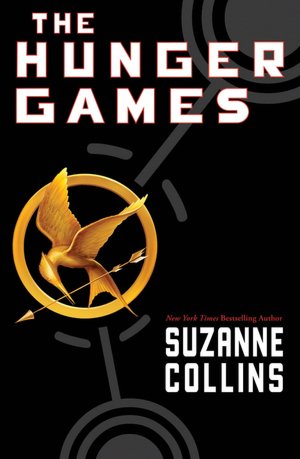
Hungry for the Games

I just finished reading The Hunger Games a few days ago. I had been reading the Song of Ice & Fire series and had just finished book four of that series and, well, just needed a break from Mr. Martin’s very epic series. I had gotten a free ePub version of The Hunger Games when I bought my Nook, so I decided to give it a shot.

I have to admit something. Despite it being the first in (apparently) a very popular trilogy and being made into a movie that comes out in a few weeks, I had never heard of The Hunger Games before being offered the free Nook edition. Not even a little bit. Ok, so it’s been years since I worked in a bookstore and was “in the loop” as to popular author and title trends, but I still feel a little bit surprised that I hadn’t even heard of this trilogy. But I digress.

So, I’ve now read the first book. What’s my honest first impression? It’s a little predictable and has a lot of borrowed themes (‘The Lottery’, ‘The Running Man’, ‘Firefly/Serenity’, ‘Survivor’, and Lord of the Flies all come to mind). A friend of mine also asked me if I found it strange that the lead character was a bit of “a moron”. To be fair, I think calling Katniss a “moron” is completely inaccurate. She’s actually very intelligent. She’s just impulsive and doesn’t always stop to think about her actions thoroughly. Ok, and she’s a bit dense when it comes to reading people, particularly when it comes to someone showing genuine love for her, but hey, she’s only 16 (for starters) and she’s also gone through a lot of emotional upheaval.

At any rate, I did enjoy the book, plan on seeing the movie, and do intend to read the remaining two books in the trilogy because I am interested to see where the story goes. But I do have to admit, had it not been given to me for free, I probably wouldn’t have even considered it. It’s nice to be pleasantly surprised by a book and have it turn out to be better than you were expecting it to be.

~ JC

Sunday, February 19, 2012

Nook Tablet – First Impressions

Yesterday I finally went out and purchased a Barnes & Noble Nook Tablet. I researched and compared the Nook, the Kindle Fire, and several other tablets over the last few months before finally settling on the Nook Tablet. I'll admit, I came quite close to just getting a seven inch Android Tablet instead, but frankly, when comparing reviews, and considering that I don't necessarily need a full blown tablet, I ultimately decided on the Nook. At $250 it's still cheaper than most other tablets on the market and at seven inches instead of ten, it's much more portable for my needs. I also chose the Nook over the Kindle due to the Kindle's apparent dependence on cloud based storage. Now, I dig cloud based storage (I have Dropbox account as well as a Skydrive account, and lately I've been making pretty heavy use of my Google Documents account as well), but I really liked that the Nook supports both on board and microSD storage and the ability to import ebooks I already own as a result. After all, neither of them have a 3G nor 4G radio and require access to WiFi to connect to the internet, so being dependent on the cloud to view my stuff isn't very helpful if I'm not near a WiFi hotspot for which I have access.

So, here's the Pros and Cons I've found with the Nook Tablet so far; bear in mind, I've had it less than twenty-four hours at this point, but I have been playing with my new toy pretty heavily since getting it home.

Pros:

  • On board storage of 16GB with support for up to 32GB of microSD storage
  • Size – very portable, although it is heavier than I was expecting it to be, but still lighter than carrying around a hardback book
  • Touchscreen – very responsive, very easy to read. It does smudge and show fingerprints pretty bad, but then again, so does every touchscreen I've ever used.
  • Nook Friends – I didn't think I'd find this to be a Pro or even something I'd necessarily use, but it's actually pretty cool that I can sync my Google and Facebook contacts with my Nook and view things that my friends have read and recommended.
  • USB transfer – plugged into my PC via a USB cable, transferring my existing ebooks, music, etc to the Nook is very very smooth. Essentially, it's no more difficult to do this than it is to use a thumb drive.
  • Reading – the built in Reader app can render both ePub and PDF formats. In fact, it does a better job of rendering PDF documents better than the built in PDF reader, which I find strange, but it's nice to have the option of using either one.
  • B&N Online – when connected to WiFi I can access Barnes & Nobles' online store and download books and media that they sell directly to the device. I also really like the fact that, if I'm in a B&N store, I get free access to WiFi and the ability to sample almost any book in their catalog for free for up to one hour before deciding if I want to buy it or not. I can also access and purchase comic books, magazines, and newspapers. And what I like about the magazine and newspaper option is that I can choose whether to buy a single issue, or pay a monthly subscription fee (rather than having to commit to a full 12-month subscription for print editions).
  • Speaking of WiFi, the setup for this was very smooth. I've connected to both the WiFi at my apartment and at my best friend's house with no problems or glitches. I haven't tried it at a B&N store yet, though.

Cons:

  • Charging – the Nook can only be charged using a wall outlet. It will not charge from a USB port, which is disappointing and also very odd to me considering that every other USB enabled device that I've ever owned will simultaneously charge while I'm transferring my files. It also takes 2-3 hours to get a full charge that lasts (according to online reports) for 8-9 hours. I've not pushed the limits on this just yet, but I did give it a full charge when I got it home and used it pretty heavily for about eight hours afterwards, and it was only down to about 40% when I decided to put it back on the charger this morning.
  • Apps – OK, I knew this going in, but the fact that I can only access apps available from the Barnes & Noble App Store is proving to be a bit more irritating than I thought it would be. Compared to the Android Market, there are far fewer apps to choose from, and fewer still that are free. I've found a few articles on ways around this limitation that I'm sure I'll play around with over the coming days.
  • Auto adding to the home screen – It's really rather annoying that, when I open up an app, that it automatically adds itself to the home screen. I'm hoping I can find a setting that will negate this. Granted, it doesn't hurt functionality, but I would much rather decide for myself which apps I want readily available on the home screen versus ones that I can access as needed from the full App menu.
  • Browser – I've never been impressed with the stock Safari browser that comes with Android devices (the Nook is the third Android OS based device I've owned, the first two both being cellphones). I've had the browser force close on me several times, most notably when trying to view notifications on Facebook. Thankfully, one of the few free apps in the B&N App Store is Dolphin Browser, which I've used before on my my cellphones and which I'll undoubtedly download soon. I've also attempted to play music through the browser using my Slacker Radio account (since the app for it isn't available in the B&N App Store) and I couldn't even get the page to fully load. So far, this is just an annoyance, not a Con, that I'm hoping can be overcome by getting a different browser app.

All in all, I really just wanted an eBook reader, but chose the Nook Tablet to be able to have, at least, some tablet functionality instead of just a reader. I'm pretty confident in my choice of the Nook Tablet. There are few irritations and quirks to get used to and overcome as it does function a little differently than a pure Android tablet. What I like the best, though, is that I can carry the equivalent of a stack of books and gaming manuals around with me without making my book bag weigh a ton.

~ JC

Saturday, February 26, 2011

Paper vs Screen (or Real Books vs E-books)

One needs only look at my collection of books to know that I am a bit of a bibliophile. I'm not just someone who enjoys reading, but I really love the books themselves. I tend to collect anything that I read, and only begrudgingly part with a book, and then only if it was really one I didn't enjoy, I just really need the shelf space to accommodate, you guessed it, more books. So, it shouldn't be any real surprise that one of the first things I downloaded when I got my Motorola Droid over a year ago was an app called Aldiko Book Reader. I've also downloaded quite a few E-books as well, but up until now, haven't read a single one. Recently, while between books (meaning I had just finished one and was deciding what novel to read next), I starting browsing through the list of items I had downloaded to my Droid. I ended up reading the poem “The Raven” by Edgar Allan Poe. It was the first time I had actually used the e-book reader to read more than a page or two of anything.

Reading that classic poem got me to wondering about if I'd actually enjoy reading a full length book on such a small screen.* So, to accommodate an experiment I decided to download an e-book for which I also own an actual copy of the book. So, when I'm at home, I read from the hard copy, but having the same book in electronic format on my Droid allows me to be able to pick up reading a few pages when I'm out and about even if I've forgotten to take my book with me. So far, I have to admit, reading a book on my phone isn't as bad I thought it would be. The tricky part, so far, with reading a book via two media formats is keeping the bookmarks synchronized. Whenever I read the book, I have make sure I move my bookmark in the e-book and vice versa or I end up reading the same pages/chapters twice.

Now that I've established that I'm perfectly content with reading a book on my smallish phone screen, I now have to decide if that will become the future of how I read books. As I mentioned before, I love books – the way they feel, the way they smell. I can easily spend quite a bit of time (not to mention money) at a bookstore. However, Aldiko has access to quite a large library of free, public domain books as well as more current books, usually for a bit cheaper than buying the hard copy. Then there's also the ability to get e-books via bit torrents.

There are also other concerns to take into account when collecting books. They take up a lot of space, and they can also be quite heavy when packed in boxes (something I have to consider since I'm still have most of my collection in storage in North Carolina and am currently establishing residency in Atlanta, GA). My old college buddy Sam had some interesting insights on this very subject some time ago. Rather than re-listing them all here, I'll suggest you read his blog entries “Digital Dilemma” and “Kobo Impressions”. The only other comment I'll make is that, while Sam bought a dedicated e-book reader, I rather like the fact that my smartphone has the ability to function as an e-book reader using the Aldiko app (or others) as well as access the internet. In other words, I only have to carry one mobile device, where someone with just an e-book reader would need to carry at least two (the reader plus their cellphone).

~ JC

PS. I should be noted that I have only cataloged physical books using LibraryThing. I've yet to catalog my e-books/PDFs save for a few.

* The Motorola Droid has a 3.7” screen